Functions in Python
There are mainly two types of functions in python
- Built-in library function: These are standard functions in Python that are available to use.
- User-defined function: We can create our own functions based on our requirements.
Python Function Declaration
def function_name(list of parameters):
body of function
return <expression>
- def is a keyword that is used to define the function
- function_name is the name of function which is user defined name
- list of parameters are the value which is passed as a arguments in the function
- body of the function is defined the actual logic of the function.
- return<expression> is the statement that is used when function return some value to the calling function.
Function Arguments
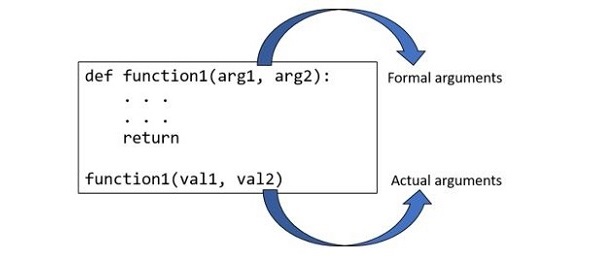
The variables passed in the function call statement are called formal arguments or actual arguments.
The variables in the parentheses in the function definition statement are called formal arguments.
def myFunction(num):print("You enter ",num, "value")myfun(10)
Types of Python Function Arguments
Python supports various types of arguments that can be passed at the time of the function call. In Python, we have the following 4 types of function arguments.
- Default argument
- Keyword arguments (named arguments)
- Positional arguments
1) Default Arguments
2) Keyword Arguments
return statement
def myAdd(a,b):
Python Tuple
- In Python, tuple is a sequence data type. It is an ordered collection of items. Each item in the tuple has a unique position index, starting from 0.
- In C/C++/Java array, the array elements must be of same type. On the other hand, Python tuple may have objects of different data types.
- Python tuple and list both are sequences. One major difference between the two is, Python list is mutable, whereas tuple is immutable that is any item from the tuple can be accessed using its index, but cannot be modified, removed or added.
Python Tuple Operations
|
Python Expression |
Results |
Description |
|
(1, 2, 3) + (4, 5, 6) |
(1, 2, 3, 4, 5, 6) |
Concatenation |
|
('Hi!',) * 4 |
('Hi!', 'Hi!', 'Hi!', 'Hi!') |
Repetition |
|
3 in (1, 2, 3) |
True |
Membership |
- In Python, Tuple is a sequence. Each object in the list is accessible with its index. The index starts from "0". Index or the last item in the tuple is "length-1". To access values in tuples, use the square brackets for slicing along with the index or indices to obtain value available at that index. The slice operator fetches one or more items from the tuple.
tup2 = (1, 2, 3, 4, 5)
print ("Item at 0th index in tup1: ", tup1[0])
output −Item at 0th index in tup1: Rohan
print ("Item at index 2 in tup2: ", tup2[2])
output − Item at index 2 in tup2:
- Python allows negative index to be used with any sequence type. The "-1" index refers to the last item in the tuple.
output − Item at 0th index in tup1: d
tup2 = (25.50, True, -55, 1+2j)
print ("Item at index 2 in tup2: ", tup2[-3])
output- Item at index 2 in tup2: True
- In python the slice operator extracts a subtuple from the original tuple.
Parameters
a) i − index of the first item in the subtup
b) j − index of the item next to the last in the subtup
This will return a slice from ith to (j-1)th items from the tup1
Example
print ("Items from index 1 to 2 in tup1: ", tup1[1:3])
output- Items from index 1 to 2 in tup1: ('b', 'c')
tup2 = (25.50, True, -55, 1+2j)
print ("Items from index 0 to 1 in tup2: ", tup2[0:2])
output − Items from index 0 to 1 in tup2: (25.5, True)
- While slicing, both operands "i" and "j" are optional. If not used, "i" is 0 and "j" is the last item in the tuple. Negative index can be used in slicing. See the following example −
tup2 = (25.50, True, -55, 1+2j)
tup4 = ("Rohan", "Physics", 21, 69.75)
tup3 = (1, 2, 3, 4, 5)
print ("Items from index 1 to last in tup1: ", tup1[1:])
output – Items from index 1 to last in tup1: ('b', 'c', 'd')
print ("Items from index 0 to 1 in tup2: ", tup2[:2])
output – Items from index 0 to 1 in tup2: (25.50, True)
print ("Items from index 2 to last in tup3", tup3[2:-1])
output- Items from index 2 to last in tup3: (3, 4)
print ("Items from index 0 to index last in tup4", tup4[:])
output- Items from index 0 to index last in tup4: ('Rohan', 'Physics', 21, 69.75)
- In Python, tuple is an immutable data type. An immutable object cannot be modified once it is created in the memory. If we try to assign a new value to a tuple item with slice operator, Python raises TypeError ('tuple' object does not support item assignment). Hence, it is not possible to update a tuple. Therefore, the tuple class doesn't provide methods for adding, inserting, deleting, sorting items from a tuple object, as the list class.
tup1[2] = 'Z'
print ("tup1: ", tup1)
It will produce an error
- Once a tuple is created, you cannot change its values. Tuples are unchangeable, or immutable as it also is called. But there is a workaround. You can convert the tuple into a list, change the list, and convert the list back into a tuple.
x = ("apple", "banana", "cherry")
y = list(x)
y[1] = "kiwi"
x = tuple(y)
print(x)
Output - ("apple", " kiwi ", "cherry")
Example - Add “orange” into the tuple
tup = ("apple", "banana", "cherry")
y = list(tup)
y.append("orange")
tup = tuple(y)
print(tup)
Output - ("apple", " kiwi ", "cherry”, “orange")
Example
tup = ("apple", "banana", "cherry")
y = list(tup)
y.remove("apple")
tup = tuple(y)
print(tup)
Output - ("banana", "cherry")
Python Lists
For example
var=[“one”,”two”,”three”]
- Creating a list in Python
print("Blank List: ")
print(myList)
- Creating a List of numbers
print("\nList of numbers: ")
print(myList)
- Creating a List of strings and accessing using index
print("\n List Items: ")
print(myList [0])
print(myList [2])
- Creating a list with multiple distinct or duplicate elements
print("\n List with the use of Numbers: ")
print(myList)
Accessing elements from the List
myList = ["One", "Two", "Three"]
print("Accessing a element from the list")
print(myList [0])
print(myList [2])
myList = [1, 2, ‘Rajesh’, 4, ‘Kamal’, 6, '’Mohan']
print("\n List with the use of Mixed Values: ")
print(myList)
Accessing elements from a multi-dimensional list
Creating a Multi-Dimensional List (By Nesting a list inside a List)myList = [['One', 'Two'], ['Three']]
print("Accessing a element from a Multi-Dimensional list")
print(myList [0][1])
print(myList [1][0])
Negative indexing
In Python, negative sequence indexes represent positions from the end of the array. Negative indexing means beginning from the end, -1 refers to the last item, -2 refers to the second-last item, etc.
ExamplemyList = [1, 2, Welcome , 4, 'To', 6, 'Lucknow']
# accessing an element using # negative indexing
print("Accessing element using negative indexing")
print(myList [-1]) # print the last element of list that is “Lucknow”
print(List[-3]) # print the third last element of list that is “To”
Python List Length
We use the len() method to find the number of elements present in a list. For example,
cars = ['BMW', 'Mercedes', 'Tesla']
print('Total Elements: ', len(cars))
# Print output, Total Elements: 3
Taking Input of a Python List
We can take the input of a list of elements as string, integer, float, etc. But the default one is a string.
Example-# input the list as string
str = input("Enter elements (Space-Separated): ")
# split the strings and store it to a list
lst = string.split()
print('The list is:', lst) # printing the list
Output:
Enter elements (Space-Separated): One Two Three
The list is: [One, Two, Three]
Add element to the Python List
We use the append() method to add elements to the end of a Python list. For example,
myList = ['apple', 'banana', 'orange']
print('Original List:', myList)
# using append method
myList.append('cherry')
print('Updated List:', myList)
Add Element at Specific Index
The insert() method adds an element to the specified index of the list. For example,
myList = ['apple', 'banana', 'orange']
print('Original List:', myList)
# using append method
myList.insert(2,'cherry')
print('Updated List:', myList)
Output-
Original List : ['apple', 'banana', 'orange']
Updated List : ['apple', 'banana', ‘cherry’,'orange']
Add Elements to a List From Other Iterables
We use the extend() method to add elements to a list from other iterables. For example,
odd_numbers = [1, 3, 5]
print('Odd Numbers:', odd_numbers)
even_numbers = [2, 4, 6]
print('Even Numbers:', even_numbers)
# adding elements of one list to another
odd_numbers.extend(even_numbers)
print('Numbers:', odd_numbers)
Output
Odd Numbers: [1, 3, 5]
Even Numbers: [2, 4, 6]
Numbers: [1, 3, 5, 2, 4, 6]
Higher Order Functions in Python
- A function is an instance of the Object type.
- You can store the function in a variable.
- You can pass the function as a parameter to another function.
- You can return the function from a function.
- You can store them in data structures such as hash tables, lists, …
Implementation of higher order function
- Passing functions as an object
- Passing function as a an arguments to other function
1) Functions as objects
In Python, a function can be assigned to a variable. This assignment does not call the function, instead a reference to that function is created. Consider the below example, for better understanding.Output:
2) Passing Function as an argument to other function
Example:
Returning function
Example:
def create_adder(x):
def adder(y):
return x + y
return adder
add_15 = create_adder(15)
print(add_15(10))
.jpeg)


.jpeg)



.jpeg)
.jpeg)


0 Comments